
Create Your Y999 Game Account
Registering on Y999 Game is a quick and straightforward process. A registered account allows users to access platform features, manage their profile, participate in promotions, and use available payment services. Whether you are a new player or joining for the first time, creating an account only takes a few minutes.
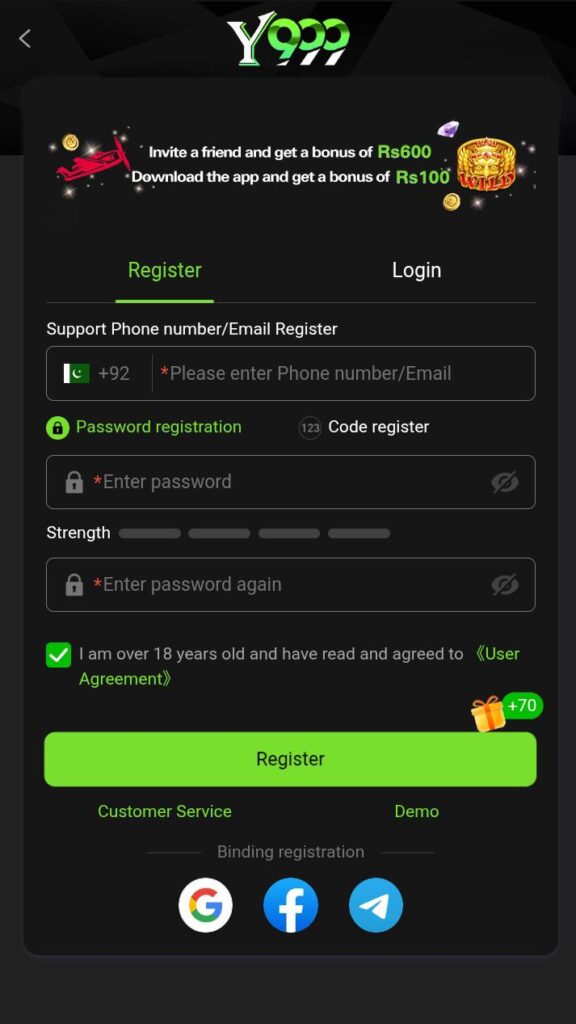
This guide explains the complete registration process, account requirements, and common solutions to registration issues.
Why Register on Y999 Game?
Creating an account unlocks access to all platform features and services.
Benefits of registration include:
- Personal account dashboard
- Secure login access
- Deposit and withdrawal options
- Access to promotions and rewards
- Account activity management
- Customer support assistance
- Mobile app access
- Profile customisation options
Registration Requirements
Before creating your account, make sure you have the following:
- A mobile phone number
- A secure password
- Stable internet connection
- Access to the Y999 registration page
- Accurate personal information
Providing correct information helps maintain account security and smooth account management.
How to Register on Y999 Game?
Follow these simple steps to create your account.
Step 1: Open the Registration Page
Visit the official Y999 Game website or open the Y999 mobile application.
Step 2: Click the Register Button
Locate and select the “Register” option on the homepage.
Step 3: Enter Your Mobile Number
Provide your active mobile number in the required field.
Step 4: Create a Strong Password
Choose a password that contains a combination of:
- Uppercase letters
- Lowercase letters
- Numbers
- Special characters
A strong password improves account protection.
Step 5: Enter Invitation Code (If Available)
If you received a referral or invitation code, enter it during registration. If you do not have one, this field may be optional.
Step 6: Review Your Information
Double-check all details before submitting the registration form.
Step 7: Complete Registration
Click the registration button to create your account.
Step 8: Login to Your Account
Once registration is successful, use your credentials to access your new Y999 account.
How to Create a Strong Password?
A secure password helps protect your account from unauthorised access.
Recommended password practices:
- Use at least 8 characters
- Include letters and numbers
- Avoid obvious words or names
- Do not use your phone number as a password
- Change your password regularly
- Never share your password with others
Registration Tips for New Users
For a smooth registration process:
- Use an active mobile number
- Enter information carefully
- Save your login credentials securely
- Register using a stable internet connection
- Complete all required fields
- Use official Y999 registration pages only
Common Registration Problems and Solutions
Mobile Number Already Registered
Cause: The phone number has been used previously.
Solution: Login using the existing account or contact customer support.
Registration Page Not Loading
Cause: Internet connection issues.
Solution: Refresh the page or switch to a stronger network.
Verification Problem
Cause: Incorrect information entered.
Solution: Review all details carefully and try again.
Password Not Accepted
Cause: Password does not meet security requirements.
Solution: Create a stronger password using letters and numbers.
Registration Submission Failed
Cause: Temporary server or network issue.
Solution: Wait a few minutes and try again.
Account Security Recommendations
After registration, follow these security practices:
- Keep login information private
- Use a unique password
- Enable available security features
- Avoid sharing account access
- Update passwords periodically
- Log out of shared devices
- Monitor account activity regularly
Benefits for Registered Users
Registered users can enjoy several platform features, including:
- Faster account access
- Secure profile management
- Convenient payment services
- Promotion eligibility
- Referral programme participation
- Customer support access
- Mobile application usage
- Account history tracking
Frequently Asked Questions
Yes, creating a Y999 Game account is free.
You should use an active mobile number that you can access when needed.
Most users can complete registration within a few minutes.
Users should follow the platform’s account policies regarding multiple registrations.
Use the password recovery option or contact customer support for assistance.
Users should always register through official Y999 channels and follow recommended security practices.
Final Words
Creating a Y999 Game account is simple and takes only a few steps. By registering successfully, users gain access to the platform’s features, account tools, promotions, and support services. Always provide accurate information, use a strong password, and keep your login credentials secure to maintain a safe account experience.